Dynamic Providers
A dynamic identity provider belongs to a federation, and the rXg finds its server through DNS, then reuses it for later logins. This page uses OpenRoaming as its example.
OpenRoaming is a federation run by the Wireless Broadband Alliance (WBA). Its members are identity providers and access network providers, the networks that phones join. OpenRoaming builds on three things:
- Passpoint, so phones join on their own.
- RadSec with certificates from the WBA's public key infrastructure (PKI), so members can trust each other.
- Dynamic peer discovery through DNS (RFC 7585), so a network can find any member's server.
On the rXg, one realm reaches every OpenRoaming identity provider. The rXg finds each provider's server from the login itself.
Read Passpoint first. It covers the setup every provider shares; this page covers what OpenRoaming adds. eduroam works the same way. Use Enable eduroam and an eduroam certificate in place of the OpenRoaming ones.
Key points:
- The rXg needs a certificate from the WBA's PKI. Fill it in together with the WBA intermediate.
- The certificate lasts one year. Renew it before it expires, or every OpenRoaming login fails.
- Add both WBA roots to Certificate Authorities, then restart the RADIUS server.
- Set Maximum TLS Version to 1.3.
- The OpenRoaming realm has no patterns, no RADIUS Servers, and a rank that no other realm uses.
- Advertise the RCOI
5a03ba0000only.- The rXg answers OpenRoaming accounting itself. It is not forwarded to the identity provider. Send each provider its usage with a scheduled report instead.
What You Need
- A RadSec certificate for the rXg from the WBA's OpenRoaming PKI. Get it through the WBA's PKI Submission page or from an OpenRoaming broker. Identity providers refuse a connection without one.
- The WBA root certificates in Certificate Authorities.
- Access to public DNS, for the discovery lookups, and to identity providers' RadSec servers over TCP, usually port 2083.
The rXg's Certificate
Every RadSec connection checks certificates in both directions. The identity provider checks the rXg's certificate, and the rXg checks the provider's:
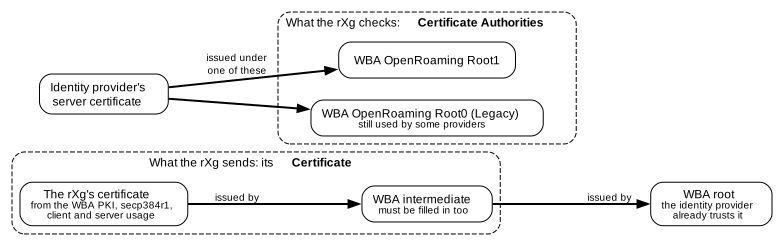
Create the certificate signing request as described in Certificate Signing Requests. It needs:
- a secp384r1 key;
- client+server usage;
- the WBA organizational unit;
- your WBA member ID as the UID;
- the OpenRoaming policy identifier.
When the signed certificate comes back, fill in the Certificate with both the certificate and the WBA intermediate. Identity providers refuse the certificate without its intermediate. The certificate must also include client in its extended key usage, or the realm won't accept it.
Using this certificate for every RadSec connection on the rXg is simplest. That includes static providers such as American Bandwidth.
The certificate is valid for one year. When it expires, identity providers refuse the handshake, and every OpenRoaming login fails. About a month before that, the rXg raises a health notice: certificate "NAME" is going to expire soon. The Expiration column in Certificates also shows the date. The rXg renews only certificates it got through ACME or EST, so request a new WBA certificate the same way as the first.
Certificate Authorities
Identity providers' servers chain to one of two WBA roots:
- WBA OpenRoaming Root1, the current root.
- WBA OpenRoaming Root0 (Legacy), the older
openroaming.orgroot. Some identity providers still use it.
Add both. The rXg ships an example config template that adds them. It appears in Config Templates as Example: 08 Openroaming Root Cas Config. Apply it, then restart the RADIUS server (see Checking a Login). Config templates are described in Backup.
Without the right root, the TLS handshake to that provider fails with self-signed certificate in certificate chain and unknown CA. Its logins are then rejected.
TLS Versions
Set Maximum TLS Version to 1.3 in RADIUS Server Options, and leave Minimum TLS Version at 1.2.
Here is why. When the rXg is limited to TLS 1.2, its RadSec connections offer only one elliptic curve, P-256. In TLS 1.2, that also rules out a provider's server certificate that uses P-384. Those providers end the handshake with handshake failure. TLS 1.3 avoids this. A provider with a P-384 certificate and no TLS 1.3 can't be reached from the rXg today.
The Realm
Create a RADIUS Server Realm for OpenRoaming:
- Name: for example,
OpenRoaming. - Rank: one that no other realm uses. Put it below realms for static providers that match on the username. Put it above realms that match the access points by IP group or policy. See RADIUS Server Realms.
- Enable OpenRoaming: ticked.
- Dynamic RadSec Client Cert: the rXg's OpenRoaming certificate.
- Attribute Patterns and policies: none. The realm matches any login whose domain publishes OpenRoaming DNS records. Logins without such records pass on to the next realm.
- RADIUS Servers: leave empty.
- Create Account: off. The other Proxy Options have no effect on this realm and can stay at their defaults; see Proxy Options.
A realm can't have both Enable OpenRoaming and Enable eduroam.
The Hotspot WLAN Profile
Add an identity provider for OpenRoaming to the Hotspot WLAN Profile, with these Home Organization IDs:
| OI | Meaning |
|---|---|
5a03ba0000 |
OpenRoaming, settlement-free. Advertise this one |
baa2d00000 |
OpenRoaming, settled: the identity provider pays the access network provider. Don't advertise it. Settled OpenRoaming needs location and WBA settlement attributes that the rXg doesn't send |
OpenRoaming phones match on the RCOI, so Hotspot RADIUS Realms are optional here. If you add any, give each one its EAP Methods, or it is not advertised. The Operator Profile domain is your own.
The Hotspot WLAN Profiles section has an example config template for an OpenRoaming profile.
How Discovery Works

For each login, the rXg takes the realm part of the outer identity: [email protected] gives idp.example. It then:
- Looks up DNS NAPTR records for that domain with the service
aaa+auth:radius.tls.tcp(eduroam usesx-eduroam:radius.tls). - Follows them to SRV records, which give the server's host and port.
- Writes a RADIUS server entry for the domain, and forwards the login there over RadSec. It presents the Dynamic RadSec Client Cert.
These steps follow RFC 7585. SIM-based realms of the form wlan.mncXXX.mccYYY.3gppnetwork.org are looked up as wlan.mncXXX.mccYYY.pub.3gppnetwork.org, as the OpenRoaming specification requires. These names come from 3GPP TS 23.003. The username is not changed.
The RADIUS server drops a discovered server about 30 seconds after its last traffic. The rXg loads it again on the next login. This shows in /var/log/radius/radius.log as radmin> add home_server file /usr/local/etc/raddb/home_servers/idp.example, followed a few seconds later by the provider's answer.
Discovered servers take logins only. So the rXg answers OpenRoaming accounting itself, and records it under the OpenRoaming realm, whatever Proxy Accounting is set to. It is not forwarded to the identity provider. To give a provider its usage, schedule a Passpoint Identity Provider report for it; see Passpoint Reports.
If a domain has no OpenRoaming records, the OpenRoaming realm doesn't match, and the login goes on to the next realm.
Checking a Server by Hand
These read-only commands, run from the rXg shell, show what discovery would find, and which root a provider's server chains to:
host -t NAPTR idp.example
host -t SRV NAME_FROM_THE_NAPTR_ANSWER
openssl s_client -connect HOST:PORT -showcerts < /dev/null | grep -E 'subject=|issuer='
The NAPTR answer for aaa+auth:radius.tls.tcp ends with a name. Look that name up for SRV records. The SRV answer gives the host and port for the last command.
Failure Signatures
| What the logs show | Cause | Fix |
|---|---|---|
self-signed certificate in certificate chain, Alert write:fatal:unknown CA |
The provider's root isn't in Certificate Authorities | Add both WBA roots, then restart the RADIUS server |
Alert read:fatal:certificate expired, then about 30 seconds later due to lack of any response from home server |
The rXg's OpenRoaming certificate has expired | Fill in a new WBA certificate with its intermediate, then restart the RADIUS server |
Alert read:fatal:handshake failure from the provider |
The provider refused the handshake. The certificate isn't WBA-issued, its intermediate is missing, or the rXg is limited to TLS 1.2 and the provider's server certificate uses P-384 | Check the certificate and its intermediate, and set Maximum TLS Version to 1.3 |
Alert read:fatal:unknown together with tlsv13 alert certificate required |
The rXg sent no client certificate | Select the Dynamic RadSec Client Cert on the realm |
Failed to add home_server on each login |
The rXg couldn't load the discovered server | Look at the message next to it, usually a certificate problem |
failed to find a configured RadiusServer for an OpenRoaming login |
The domain publishes no OpenRoaming records, or the rXg can't resolve DNS | Check with host -t NAPTR, as above |
write ... radsec_CAs.pem: Permission denied |
A side effect of an earlier TLS failure, not the cause | Fix the TLS failure, then restart the RADIUS server |
Checklist
These repeat the key points of this page. The Passpoint checklist covers the rest.
- The rXg's OpenRoaming Certificate holds the certificate and the WBA intermediate, with client and server usage.
- The certificate hasn't expired, and you know when it will. It lasts one year.
- Both WBA roots are in Certificate Authorities, and the RADIUS server was restarted afterwards.
- Maximum TLS Version is 1.3.
- The OpenRoaming realm has Enable OpenRoaming, the Dynamic RadSec Client Cert, no patterns, no RADIUS Servers, a rank of its own, and Create Account off.
- The Hotspot WLAN Profile advertises
5a03ba0000. - From the rXg shell,
host -t NAPTRanswers for a test provider's domain.


