Connection States
The Connection States instrument displays the current packet filter (PF) state table entries, showing all active network connections passing through the rXg.
Note: In cluster deployments, a Cluster Node field is displayed in applicable scaffolds to indicate which node the entry belongs to.
Connection States
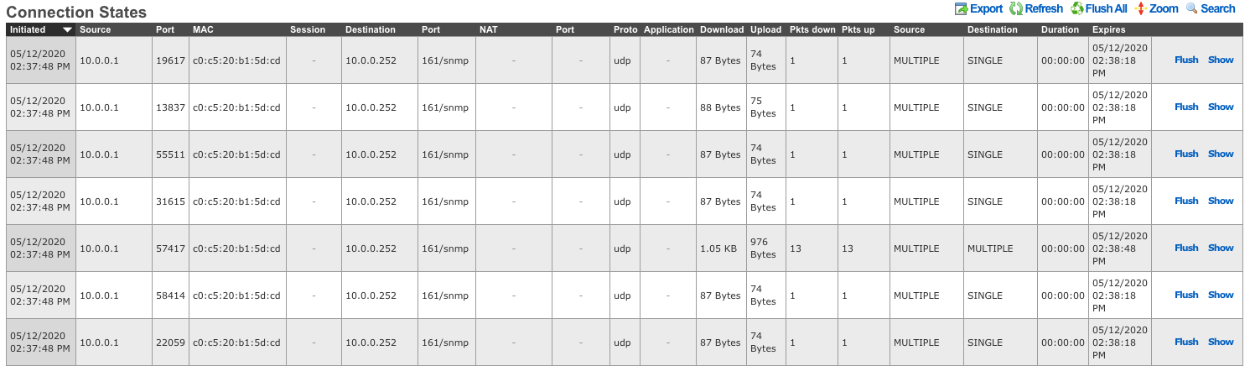
The Connection States table provides the operator with a list of all current connection states tracked by the rXg firewall.
The Initiated At field shows when the connection was established. The Source IP and Source Port fields display the originating endpoint of the connection. The MAC field shows the source device's MAC address. The Login Session field links to the associated login session if the connection belongs to an authenticated user.
The Destination IP and Destination Port fields show the remote endpoint of the connection. The Translated IP and Translated Port fields display the NAT-translated address and port if network address translation is applied to the connection.
The Protocol field indicates the transport protocol (TCP, UDP, ICMP, etc.). The Net App field shows the identified application or service if application identification is enabled.
The Bytes Down and Bytes Up fields display the amount of data transferred in each direction. The Pkts Down and Pkts Up fields show the packet counts in each direction.
The Source State and Destination State fields indicate the TCP connection state for each endpoint (e.g., ESTABLISHED, TIME_WAIT, FIN_WAIT). The Duration field shows how long the connection has been active. The Expires At field indicates when the state entry will be removed if no further traffic is seen. The IP6 field indicates whether this is an IPv6 connection.