Modern API
The rXg provides a modern RESTful API at /api/ that is the recommended interface for all new integrations. This API offers a browsable HTML interface, built-in pagination, rate limiting, and consistent JSON responses. It covers all rXg models and supports full CRUD operations.
The legacy scaffold-based API at /admin/scaffolds/ remains available for backward compatibility, but all new development should target the /api/ endpoints documented here.
Base URL
The base URL for the modern API is:
https://DNS.record.for.rXg/api/
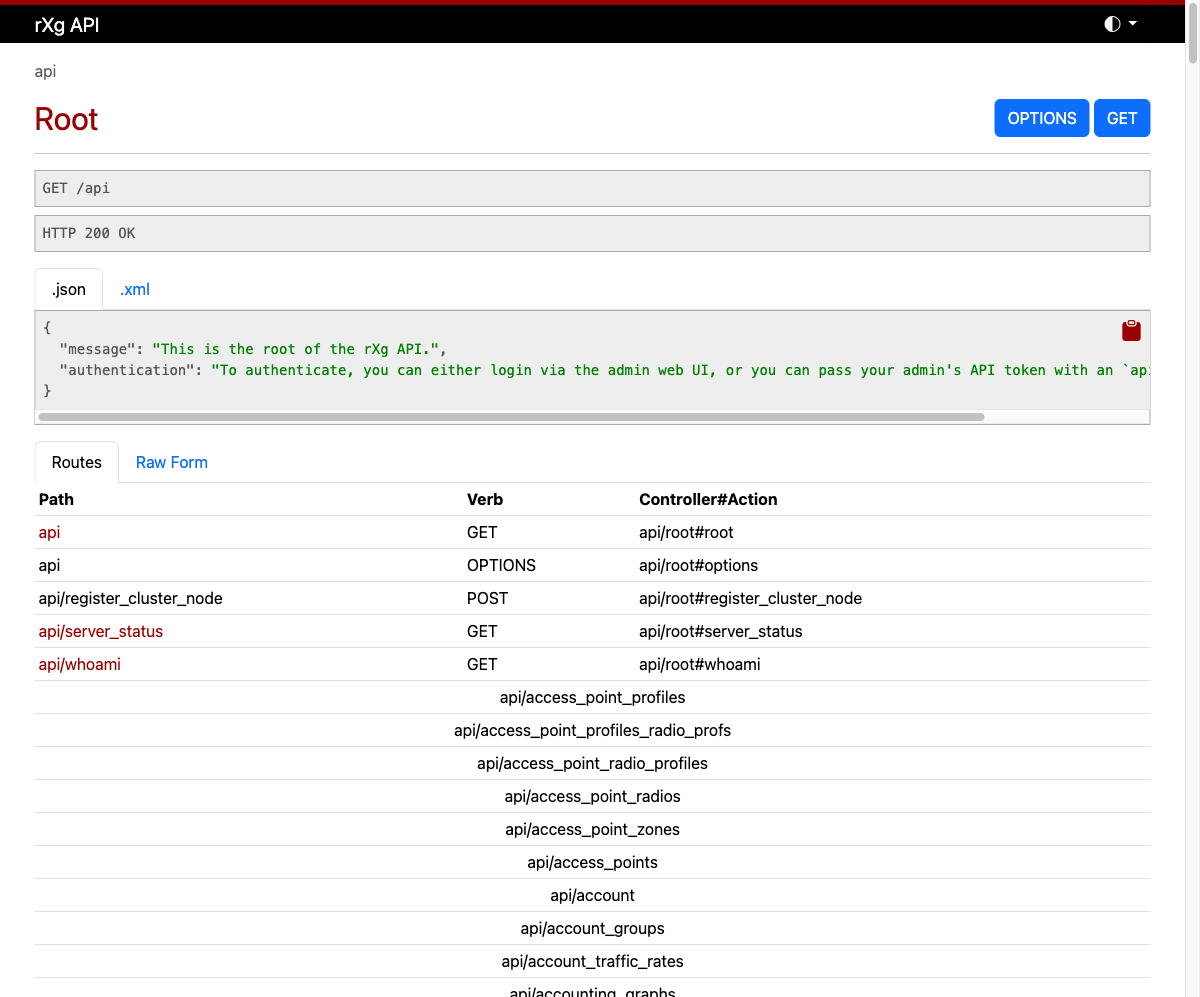
Navigating to this URL in a browser while logged in as an admin displays the browsable API root, which lists all available endpoints and their routes.
Authentication
There are three ways to authenticate with the API:
API Key (Query Parameter)
Pass your API key as a URL parameter:
https://DNS.record.for.rXg/api/accounts?api_key=YOUR_API_KEY
API Key (Bearer Token)
Pass your API key in the Authorization header:
curl -H "Authorization: Bearer YOUR_API_KEY" \
  https://DNS.record.for.rXg/api/accounts
Login Endpoint
If you do not have an API key, you can authenticate with admin credentials to receive a temporary API key valid for 7 days:
curl -X POST https://DNS.record.for.rXg/api/login \
  -d "username=admin&password=secret"
Response:
{
  "api_key": "abc123...",
  "name": "a1b2c3d4-e5f6-...",
  "expiration": "2026-04-25T12:00:00-04:00"
}
API keys are managed on the Admins page. Each admin account can have multiple API keys with optional expiration dates. It is good security practice to create separate API keys for each integration.
Data Formats
The API supports both JSON and XML output. JSON is the default and recommended format.
To request a specific format, append the format extension to the URL:
https://DNS.record.for.rXg/api/accounts.json
https://DNS.record.for.rXg/api/accounts.xml
You can also set the Accept header:
curl -H "Accept: application/json" https://DNS.record.for.rXg/api/accounts?api_key=KEY
curl -H "Accept: application/xml" https://DNS.record.for.rXg/api/accounts?api_key=KEY
CRUD Operations
The API follows standard REST conventions using HTTP verbs:
| Operation | HTTP Method | URL Pattern | Description |
|---|---|---|---|
| List | GET | /api/accounts |
Retrieve all records (paginated) |
| Show | GET | /api/accounts/42 |
Retrieve a single record by ID |
| Create | POST | /api/accounts |
Create a new record |
| Update | PUT/PATCH | /api/accounts/42 |
Update an existing record |
| Destroy | DELETE | /api/accounts/42 |
Delete a record |
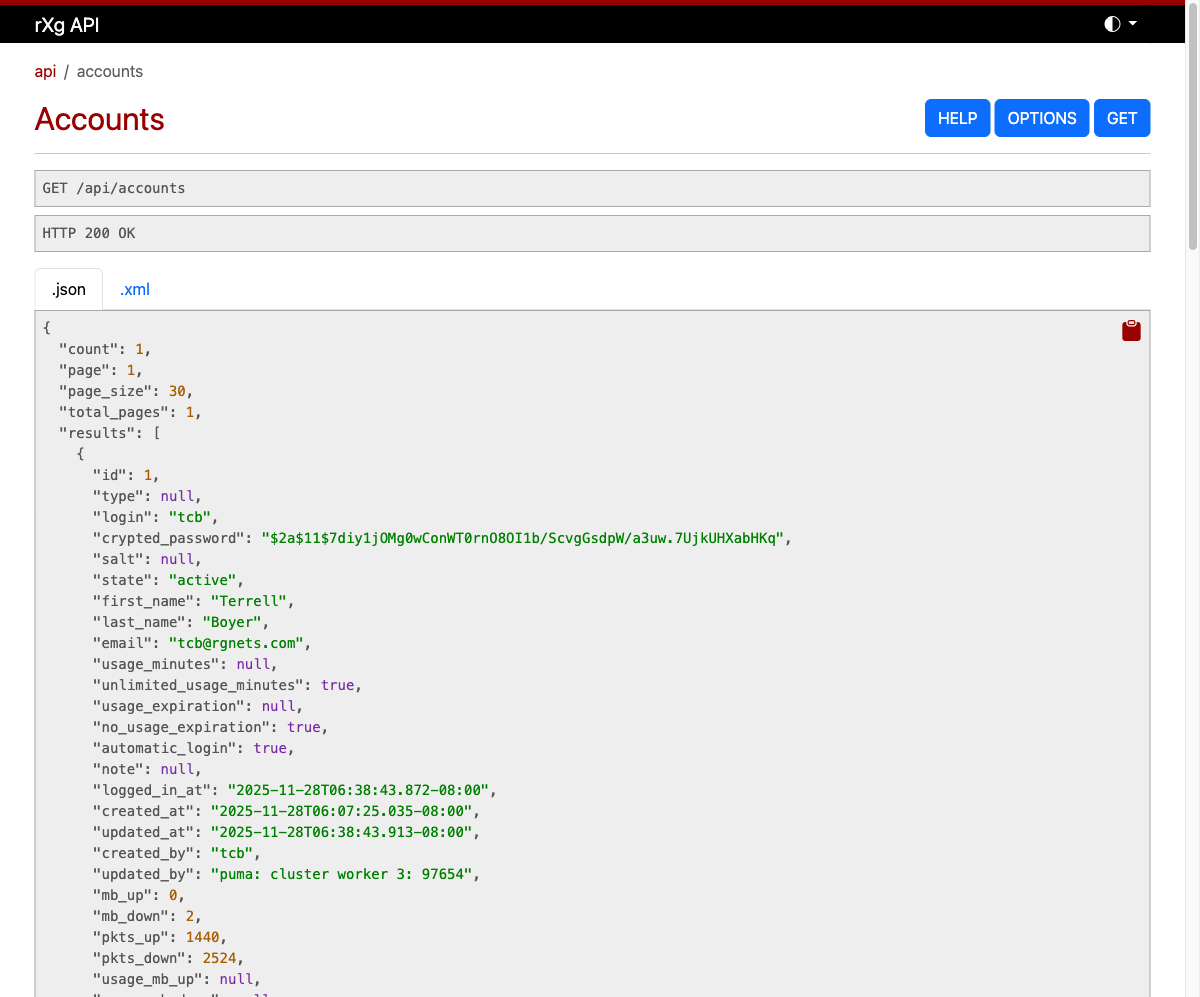
List
Retrieve a paginated list of records:
curl https://DNS.record.for.rXg/api/accounts?api_key=KEY
Response:
{
  "count": 150,
  "page": 1,
  "page_size": 30,
  "total_pages": 5,
  "results": [
    {
      "id": 1,
      "login": "jsmith",
      "first_name": "John",
      "last_name": "Smith",
      "email": "[email protected]",
      ...
    },
    ...
  ]
}
Show
Retrieve a single record by ID:
curl https://DNS.record.for.rXg/api/accounts/1?api_key=KEY
Create
Create a new record by sending a POST with the record attributes:
curl -X POST https://DNS.record.for.rXg/api/accounts?api_key=KEY \
  -H "Content-Type: application/json" \
  -d '{"login": "newuser", "first_name": "New", "last_name": "User", "email": "[email protected]", "password": "secret", "password_confirmation": "secret"}'
Update
Update an existing record:
curl -X PATCH https://DNS.record.for.rXg/api/accounts/42?api_key=KEY \
  -H "Content-Type: application/json" \
  -d '{"first_name": "Updated"}'
Destroy
Delete a record:
curl -X DELETE https://DNS.record.for.rXg/api/accounts/42?api_key=KEY
Filtering and Search
The API provides two complementary mechanisms for narrowing results: field filtering and full-text search.
Field Filtering
Filter results by passing field names as query parameters. This performs an exact match on the specified field:
curl "https://DNS.record.for.rXg/api/accounts?api_key=KEY&login=jsmith"
Multiple filters can be combined:
curl "https://DNS.record.for.rXg/api/accounts?api_key=KEY&state=active&account_group_id=3"
Field filtering also supports comparison predicates by appending a suffix to the field name:
| Suffix | Operator | Example |
|---|---|---|
_lt |
Less than | ?created_at_lt=2026-01-01 |
_lte |
Less than or equal | ?mb_down_lte=100 |
_gt |
Greater than | ?created_at_gt=2025-01-01 |
_gte |
Greater than or equal | ?mb_up_gte=50 |
_cont |
Contains (case-sensitive) | ?login_cont=smith |
_in |
In list | ?state_in=active,suspended |
These predicates can be combined to form range queries:
# Accounts created in 2025
curl "https://DNS.record.for.rXg/api/accounts?api_key=KEY&created_at_gte=2025-01-01&created_at_lt=2026-01-01"

# Accounts with login containing "admin"
curl "https://DNS.record.for.rXg/api/accounts?api_key=KEY&login_cont=admin"
Full-Text Search
Some endpoints support the search query parameter, which performs a case-insensitive partial match (ILIKE) across one or more fields:
curl "https://DNS.record.for.rXg/api/ar_transactions?api_key=KEY&search=10.0.0.1"
The fields searched depend on the endpoint. For example, the AR Transactions endpoint searches across the reason, ip, mac, and login fields. Not all endpoints have full-text search configured; use field filtering as the primary approach for narrowing results.
Combining Filters
Field filters, search, sorting, and pagination can all be combined in a single request:
curl "https://DNS.record.for.rXg/api/accounts?api_key=KEY&state=active&login_cont=smith&ordering=login&page=1&page_size=10"
Sorting
Sort results using the ordering query parameter. Prefix a field name with - for descending order:
# Sort ascending by login
curl "https://DNS.record.for.rXg/api/accounts?api_key=KEY&ordering=login"

# Sort descending by created_at
curl "https://DNS.record.for.rXg/api/accounts?api_key=KEY&ordering=-created_at"
Pagination
All list endpoints are paginated with a default page size of 30 records. Pagination metadata is returned in the response body.
Query Parameters
| Parameter | Description |
|---|---|
page |
Page number (default: 1) |
page_size |
Records per page (default: 30) |
curl "https://DNS.record.for.rXg/api/accounts?api_key=KEY&page=2&page_size=10"
Response Body
The response includes pagination metadata and navigation links:
{
  "count": 150,
  "page": 2,
  "page_size": 10,
  "total_pages": 15,
  "next": "https://DNS.record.for.rXg/api/accounts?api_key=KEY&page=3&page_size=10",
  "previous": "https://DNS.record.for.rXg/api/accounts?api_key=KEY&page=1&page_size=10",
  "results": [...]
}
Rate Limiting
The API enforces rate limits to protect the system from excessive requests. Rate limits are applied per IP address and can be further customized per API key.
Default Limits
| Operation | Default Limit | Period |
|---|---|---|
| Read (GET) | 200 requests | 60 seconds |
| Write (POST/PUT/PATCH/DELETE) | 60 requests | 60 seconds |
| Authentication (POST /api/login) | 10 requests | 60 seconds |
These defaults can be adjusted system-wide via the Device Options scaffold.
Per-Key Overrides
Individual API keys can have custom rate limits configured via the rate_limit_override field on the API key record.
Response Headers
Every API response includes rate limit information:
| Header | Description |
|---|---|
X-RateLimit-Limit |
Maximum requests allowed in the current period |
X-RateLimit-Remaining |
Requests remaining in the current period |
X-RateLimit-Reset |
Unix timestamp when the rate limit resets |
When the rate limit is exceeded, the API responds with HTTP 429 and includes a Retry-After header indicating how many seconds to wait.
Utility Endpoints
Server Status
A lightweight health check endpoint that requires no authentication:
curl https://DNS.record.for.rXg/api/server_status
{"message": "Server Operational"}
Who Am I
Returns metadata about the currently authenticated user:
curl https://DNS.record.for.rXg/api/whoami?api_key=KEY
{"type": "admin", "id": 1, "login": "admin"}
Help
Every model endpoint provides a help action that returns the scaffold documentation:
curl https://DNS.record.for.rXg/api/accounts/help?api_key=KEY
Execute
The execute action allows calling model methods via the API. This is restricted to admin accounts with write-master permissions:
curl -X POST "https://DNS.record.for.rXg/api/accounts/execute?api_key=KEY" \
  -H "Content-Type: application/json" \
  -d '{"method": "count"}'
For instance methods, include the record ID in the URL:
curl -X POST "https://DNS.record.for.rXg/api/accounts/42/execute?api_key=KEY" \
  -H "Content-Type: application/json" \
  -d '{"method": "devices"}'
Browsable API
When accessed from a web browser, the API renders an interactive HTML interface. This interface displays:
- The current endpoint and HTTP method
- Response data formatted as JSON or XML (switchable via tabs)
- A route table showing all available sub-endpoints
- HELP, OPTIONS, and action buttons
This is useful for exploring the API interactively without writing code.
Comparison with Legacy Scaffold API
| Feature | Modern API (/api/) |
Legacy Scaffold API (/admin/scaffolds/) |
|---|---|---|
| Base URL | /api/ |
/admin/scaffolds/ |
| Default format | JSON | XML |
| Pagination | Built-in with metadata | Manual (per_page parameter) |
| Rate limiting | Per-IP and per-key with headers | None |
| Browsable interface | Yes | No |
| Inline help | Yes (/help action) |
No |
| Authentication | API key (query param or Bearer header) | API key (query param only) |
| Sorting | ordering parameter (prefix - for descending) |
Limited |
Both APIs authenticate using the same API keys managed on the Admins page.