Routing
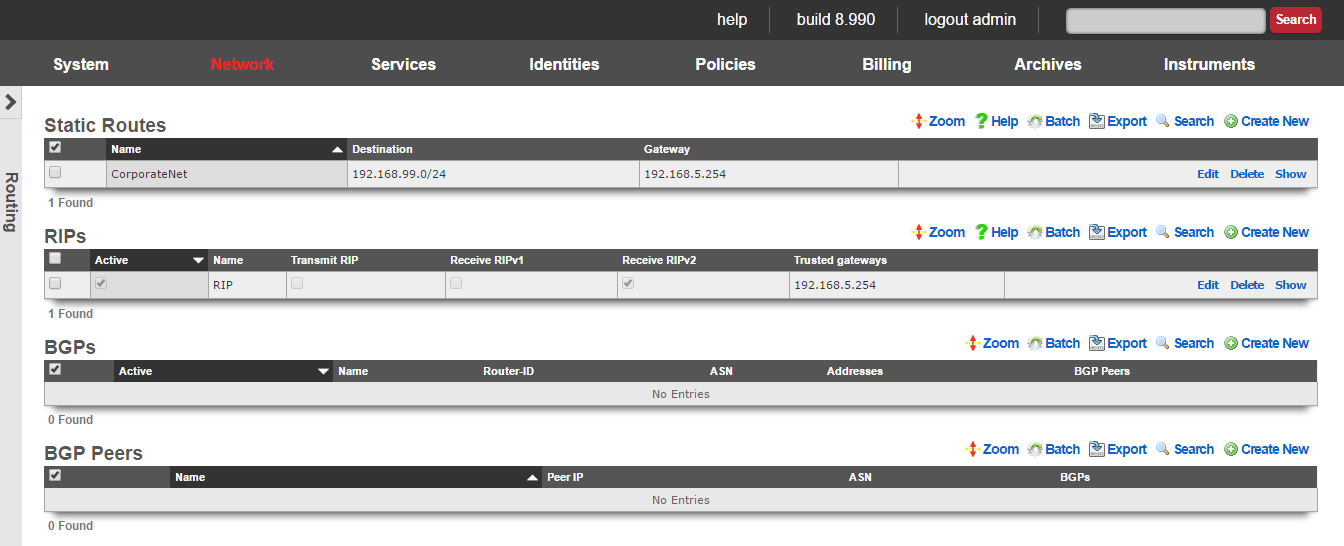
The routing view presents the scaffolds that configure settings to that control the static and dynamic entries into the rXg routing table.
The routing table of an rXg governs where packets are forwarded based on their desired destination. In a basic rXg installation where end-users are L2 connected to the LAN side of the rXg which is in turn connected to a single uplink, the routing table that is automatically created by the rXg is sufficient. In this case, no changes should be made to any of the scaffolds on the routing view.
If the rXg is deployed with a L3 routed distribution network for end-user access, then the rXg must be informed of all connected networks in order to properly route traffic and deliver forced browser redirection. This is typically accomplished by creating static routes for the various subnets that are connected behind L3 routers on the LAN side of the rXg.
The rXg supports distribution and integration of routes via RIP primarily for the purposes of simplifying cluster management. When an rXg cluster is deployed and routing between end-users on different nodes is desired, the rXgs must be informed as to all of the subnets that are behind the various cluster nodes. In addition, the rXg may broadcast router discovery responses to LAN nodes so that they may build up the internal routing tables on LAN nodes. This is particularly useful for LAN nodes that are locally and remotely accessible servers as this provides a simple mechanism for dynamic failover between multiple cluster nodes.
Static Routes
An entry in the static routes scaffold creates an entry in the IP routing table of the rXg.
The name field is an arbitrary string descriptor used only for administrative identification. Choose a name that reflects the purpose of the record. This field has no bearing on the configuration or settings determined by this scaffold.
The destination field configures the CIDR block for which a specific gateway is needed.
The gateway is the IP address of the next hop router for the CIDR block specified in the destination field.
The note field is a place for the administrator to enter a comment. This field is purely informational and has no bearing on the configuration settings.
BGP

The BGP scaffold configures the Border Gateway Protocol (BGP) daemon on the rXg. BGP is an exterior gateway protocol used to exchange routing information between autonomous systems. The rXg uses BGP to announce local networks to upstream providers and to receive routes from BGP peers.
The active field enables an option set. Exactly one option set may be active at any time. Enabling a particular option set will automatically disable another existing active option set. Note that BGP and RIP cannot be active simultaneously.
The name field is an arbitrary string descriptor used only for administrative identification. Choose a name that reflects the purpose of the record. This field has no bearing on the configuration or settings determined by this scaffold.
The router ID field specifies the BGP router identifier. This must be a valid IPv4 address and is typically set to one of the rXg's IP addresses. The router ID uniquely identifies this BGP speaker to its peers.
The ASN field configures the Autonomous System Number for this rXg. The ASN is a unique identifier assigned to your network by a regional internet registry. Valid ASN values range from 1 to 4294967295, with private ASN ranges available for internal use (64512-65534 for 16-bit, 4200000000-4294967294 for 32-bit).
The min prefix length and max prefix length fields filter the prefixes accepted from BGP peers based on their CIDR prefix length. For example, setting min to 8 and max to 24 would accept prefixes from /8 to /24 but reject more specific routes like /25 or /32.
The accept default route checkbox allows the rXg to accept a default route (0.0.0.0/0) from BGP peers. Enable this if your upstream provider advertises a default route via BGP.
The accept RFC 1918 CIDRs checkbox allows the rXg to accept private address space (10.0.0.0/8, 172.16.0.0/12, 192.168.0.0/16) from BGP peers. This is typically disabled for public BGP peering but may be useful for internal BGP deployments.
The accept RFC 3330 CIDRs checkbox allows the rXg to accept special-use address blocks defined in RFC 3330, such as loopback addresses and link-local addresses.
The peer failover checkbox enables automatic failover between BGP peers. When enabled, if the primary peer goes offline, traffic will automatically route through available backup peers.
The split announcements checkbox configures the rXg to announce different prefix sets to different peers. This is useful for traffic engineering scenarios where you want to influence inbound traffic paths. Note that this option cannot be enabled simultaneously with peer failover.
The addresses field associates network addresses with this BGP configuration. Associated addresses will be announced to BGP peers as locally originated prefixes.
The BGP peers field associates BGP peer configurations with this option set. At least one BGP peer must be configured for BGP to function.
The cluster node field associates this BGP configuration with a specific cluster node. In cluster deployments, each node may have its own BGP configuration.
The note field is a place for the administrator to enter a comment. This field is purely informational and has no bearing on the configuration settings.
BGP Peers

The BGP Peers scaffold configures the external BGP neighbors that the rXg will establish peering sessions with. Each peer represents an upstream provider or adjacent network that exchanges routing information with the rXg.
The name field is an arbitrary string descriptor used only for administrative identification. Choose a name that reflects the purpose of the record. This field has no bearing on the configuration or settings determined by this scaffold.
The IP field specifies the IP address of the BGP peer. This is the address the rXg will establish the BGP session with.
The ASN field configures the Autonomous System Number of the remote peer. This must match the ASN configured on the peer's side for the BGP session to establish.
The password field configures the MD5 authentication password for the BGP session. If specified, both sides of the peering session must use the same password. Leave blank if no authentication is required.
The uplink field associates this BGP peer with a specific uplink. This determines which interface and source IP address the rXg uses to reach the peer.
The active checkbox enables or disables this BGP peer. Disabled peers will not establish BGP sessions.
The note field is a place for the administrator to enter a comment. This field is purely informational and has no bearing on the configuration settings.
BGP Static Routes
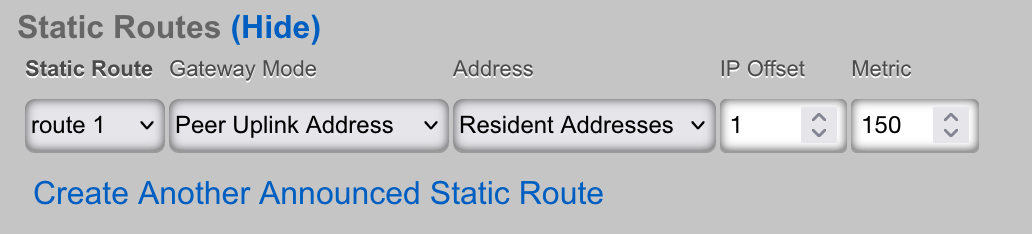
The BGP Static Routes scaffold enables the announcement of static routes via BGP. This allows operators to advertise specific prefixes to BGP peers with customized gateway and metric settings, independent of the routes configured in the Static Routes scaffold.
The static route field associates this BGP announcement with an existing static route. The destination prefix of the selected static route will be announced to BGP peers associated with the selected BGP option.
The BGP option field specifies which BGP configuration this route announcement belongs to. The route will only be announced when the associated BGP option is active.
The gateway mode field determines how the next-hop address is set for this route announcement:
- Default - Uses the gateway configured in the associated static route
- Static Route Gateway - Explicitly uses the static route's gateway as the BGP next-hop
- Peer Uplink Address - Sets the next-hop to the IP address of the uplink associated with each BGP peer, useful for multi-homed configurations
- Local Address - Uses a specific local address as the next-hop
The address field specifies a local network address to use as the next-hop when the gateway mode is set to "Local Address".
The gateway offset field adjusts the gateway address by the specified number of IP addresses. This is useful when the actual next-hop differs slightly from the static route gateway. Valid values range from 0 to 1024.
The metric field sets the BGP Multi-Exit Discriminator (MED) for this route announcement. Lower MED values are preferred by BGP peers when selecting between multiple paths to the same destination. Valid values range from 0 to 1024.
BGP Configuration Example
A typical BGP configuration involves the following steps:
- Create a BGP Options record with your ASN and router ID
- Create BGP Peers records for each upstream provider
- Associate network addresses with the BGP option to announce them
- Optionally create BGP Static Routes for granular control over specific prefix announcements
- Activate the BGP option to begin peering
The status of BGP sessions can be monitored in the Instruments :: Routes :: BGP Entries scaffold, which displays the state of each peering session, prefixes received, and message statistics.
RIP
The RIP scaffold controls the behavior of the rXg with respect to RFC 1058 and RFC 2453 router information protocol messages. The rXg may be configured to broadcast route advertisements as well as accept RIP announcements from other routers.
The active field enables an option set. Exactly one option set may be active at any time. Enabling a particular option set will automatically disable another existing active option set.
The name field is an arbitrary string descriptor used only for administrative identification. Choose a name that reflects the purpose of the record. This field has no bearing on the configuration or settings determined by this scaffold.
The transmit RIP checkbox enables the broadcast of route advertisements to locally connected networks. When this box is checked, the rXg will make RIP announcements
The receive RIPv1 and receive RIPv2 checkboxes enable the rXg to receive RIPv1 and RIPv2 route advertisements respectively.
The RIPv2 password field configures the shared security credential that will be used when sending and receiving RIPv2 announcements.
The trusted gateways field is where the operator specifies the routers from which RIP announcements will be accepted. In order to prevent injection of false routers, it is required that one or more trusted gateways be specified in order to receive RIP announcements.
The note field is a place for the administrator to enter a comment. This field is purely informational and has no bearing on the configuration settings.
BGP
The Border Gateway Protocol (BGP) scaffolds enable the rXg to participate in dynamic routing with upstream providers and peer networks using the industry-standard BGP-4 protocol. BGP is the routing protocol that powers the Internet, allowing autonomous systems to exchange routing information and make intelligent forwarding decisions.
Accessing BGP Configuration
BGP configuration is accessed via the Network::Routing view in the rXg administrative console. The routing view contains the following BGP-related scaffolds:
- BGP - Configures the BGP daemon settings including local ASN, router ID, and filtering options
- BGP Peers - Defines BGP neighbor relationships with upstream providers or peer networks
- Announced Static Routes - Configures static routes to be redistributed into BGP
To monitor BGP session status, navigate to Instruments::Routes and view the BGP Entries scaffold, which displays real-time peering session information.
                           rXg ADMIN CONSOLE NAVIGATION


    CONFIGURATION                                    MONITORING


    Network                                          Instruments

        Routing                                      Routes

                Static Routes                                 OpenVPN Entries
                RIP                                           IPsec Entries
                BGP             daemon config              BGP Entries     session status
                BGP Peers       neighbor config            Routes
                Announced       route redistribution
                   Static Routes
When to Use BGP
BGP is appropriate when the rXg deployment requires:
- Multi-homed connectivity with multiple upstream ISPs where the rXg needs to receive full or partial routing tables
- Provider-independent IP space that must be announced to upstream networks
- Traffic engineering capabilities to influence inbound and outbound traffic paths
- High availability with automatic failover based on BGP session state
- Peering relationships with other networks at Internet Exchange Points (IXPs)
                                                  INTERNET


                                  ISP A (AS 64501)      ISP B (AS 64502)
                                 Primary Provider      Backup Provider


                                    BGP Session            BGP Session
                                   (eBGP Peering)        (eBGP Peering)


                                            rXg (AS 65000)


                                          BGP Daemon (FRR)

                                    Announces: 203.0.113.0/24
                                    Announces: 198.51.100.0/24
                                    Receives:  Full/Partial Table


                                            LAN Networks
                                       (End Users / Servers)
BGP vs RIP
The rXg supports both RIP and BGP for dynamic routing, but they serve different purposes and cannot be enabled simultaneously. The following comparison helps determine which protocol is appropriate:
    Attribute                     RIP                              BGP

 Protocol Type       Interior Gateway Protocol (IGP)  Exterior Gateway Protocol (EGP)
 Typical Use         Internal/Cluster routing         Internet/ISP connectivity
 Scalability         Small networks (15 hops)        Internet scale
 Convergence         Slow (30-180 seconds)            Fast (seconds)
 Path Selection      Hop count only                   Multiple attributes (AS path,
                                                      local pref, MED, etc.)
 Authentication      Plaintext password               MD5 authentication
 Route Filtering     Limited                          Extensive prefix-list support
BGP Configuration Workflow
The following diagram illustrates the recommended order for configuring BGP on the rXg:
                           BGP CONFIGURATION WORKFLOW


    Step 1                    Step 2                    Step 3                    Step 4

  Configure              Configure               Create                Associate
    BGP         BGP Peers     Announced     Addresses
   Options              (Neighbors)           Static Routes             to BGP


  Set local ASN           Add peer IPs           Select routes           Link network
  Set router ID           Set remote ASNs         to announce              addresses to
  Configure prefix        Set passwords          Configure                BGP options
   length filters          Associate with          gateway modes           These will be
  Set RFC filtering        uplinks                Set metrics              announced to
   options                 Enable/disable                                   all peers
                            peers


                                 Activate BGP
                                 Configuration

                                Set 'Active' =
                                on BGP Options


                                Monitor Sessions

                                Instruments
                                Routes
                                BGP Entries
Prerequisites
Before configuring BGP, ensure the following requirements are met:
- Uplinks configured - At least one uplink must be configured and online in the Network::WAN view
- IP connectivity - The rXg must have IP reachability to the BGP peer addresses
- Coordination with upstream - Obtain the following from your upstream provider(s):
- Their Autonomous System Number (ASN)
- Their BGP peer IP address(es)
- MD5 authentication password (if required)
- Prefix announcements they expect to receive from you
- Any specific filtering requirements
BGP Session States
Understanding BGP session states is essential for troubleshooting. The rXg displays session states in the BGP Entries instrument:
    State                                 Description

 Idle          Initial state. BGP is waiting to start or has been reset.
               Check: Peer IP reachability, firewall rules (TCP 179)

 Active        BGP is actively trying to establish a TCP connection to the peer.
               Note: "Active" does NOT mean the session is established!
               Check: Remote peer configuration, network connectivity

 Connect       TCP connection is in progress.
               Transient state - should progress quickly

 OpenSent      TCP connection established, OPEN message sent, waiting for response.
               Check: ASN mismatch, authentication mismatch

 OpenConfirm   OPEN message received, waiting for KEEPALIVE or NOTIFICATION.
               Check: Capability negotiation issues

 Established   BGP session is fully operational. Routes are being exchanged.
               This is the desired operational state.

 Shutdown      Peer has been administratively disabled (Active checkbox unchecked).
               Action: Enable the peer if connectivity is desired
BGP Options
An entry in the BGP options scaffold configures the BGP daemon (bgpd) that runs on the rXg. This scaffold defines the local BGP speaker parameters including the Autonomous System Number, router identifier, and inbound route filtering policies.
The active field enables the BGP configuration. Exactly one BGP option set may be active at any time. Enabling a particular option set will automatically disable another existing active option set. Important: BGP and RIP cannot be active simultaneously; activating BGP will generate an error if RIP is already active.
The name field is an arbitrary string descriptor used only for administrative identification. Choose a name that reflects the purpose of the record. This field has no bearing on the configuration or settings determined by this scaffold.
The router ID field specifies the BGP router identifier, which uniquely identifies this BGP speaker. The router ID must be a valid IPv4 address format (even when using IPv6 BGP). Best practice is to use a loopback address or the primary WAN IP address of the rXg. The router ID should remain stable across reboots and configuration changes.
The ASN field specifies the local Autonomous System Number. This is the AS number that identifies your network to BGP peers. Valid values range from 1 to 4294967295 (supporting both 2-byte and 4-byte ASNs). If you have not been assigned an ASN by a Regional Internet Registry (RIR), you may use a private ASN in the range 64512-65534 (2-byte) or 4200000000-4294967294 (4-byte) for private peering arrangements.
The min prefix length field sets the minimum prefix length (in bits) that will be accepted from BGP peers. Routes with prefix lengths shorter than this value will be filtered. Valid values are 1-32 for IPv4. For example, setting this to 8 will reject any prefix shorter than /8 (such as a /4 or default route, unless explicitly allowed).
The max prefix length field sets the maximum prefix length (in bits) that will be accepted from BGP peers. Routes with prefix lengths longer than this value will be filtered. Valid values are 1-32 for IPv4. For example, setting this to 24 will reject any prefix longer than /24 (such as /25, /26, etc.). This helps prevent route table bloat from overly specific prefixes.
                         INBOUND PREFIX FILTERING

    Received               Prefix Length              Accepted/
    Prefix                 Filter Check               Rejected


    0.0.0.0/0        min=8, max=24        REJECTED (too short)
                          accept_default=NO           unless accept_default_route=YES

    10.0.0.0/8       min=8, max=24        REJECTED (RFC 1918)
                          accept_rfc_1918=NO          unless accept_rfc_1918_cidrs=YES

    192.0.2.0/24     min=8, max=24        REJECTED (RFC 3330)
                          accept_rfc_3330=NO          unless accept_rfc_3330_cidrs=YES

    8.8.8.0/24       min=8, max=24        ACCEPTED

    1.2.3.0/28       min=8, max=24        REJECTED (too long)
The accept default route checkbox, when enabled, allows the rXg to accept the default route (0.0.0.0/0) from BGP peers. When disabled (default), the default route is explicitly filtered regardless of the min/max prefix length settings. Enable this only if you want BGP peers to provide default routing for the rXg.
The accept RFC 1918 CIDRs checkbox, when enabled, allows the rXg to accept private network prefixes as defined in RFC 1918. These include 10.0.0.0/8, 172.16.0.0/12, and 192.168.0.0/16 and any more-specific prefixes within these ranges. When disabled (default), these prefixes are filtered to prevent private address space from polluting the routing table via BGP.
The accept RFC 3330 CIDRs checkbox, when enabled, allows the rXg to accept special-use and reserved address prefixes as defined in RFC 3330. These include addresses reserved for documentation (192.0.2.0/24, 198.51.100.0/24, 203.0.113.0/24), benchmarking (198.18.0.0/15), and other special purposes. When disabled (default), these prefixes are filtered.
The split announcements checkbox, when enabled, causes the rXg to subdivide the associated addresses across all BGP peers that have an online uplink. This feature is useful for load balancing outbound traffic across multiple upstream providers by announcing different portions of your address space to different peers. Note: Split announcements cannot be enabled simultaneously with peer failover.
                         SPLIT ANNOUNCEMENTS EXAMPLE

    Associated Addresses: 203.0.113.0/24 (256 IPs)
    Online Peers: 2 (ISP-A and ISP-B)


                            rXg BGP Speaker

       Address Pool: 203.0.113.0/24

       Split into:
        203.0.113.0/25   (0-127)
        203.0.113.128/25 (128-255)


          ISP-A                           ISP-B

     Receives:                       Receives:
     203.0.113.0/25                  203.0.113.128/25
The peer failover checkbox, when enabled, causes the rXg to announce networks only to the BGP peer associated with the highest-priority online uplink. When this peer's uplink goes offline, announcements automatically shift to the next highest-priority peer with an online uplink. This provides simple active/standby failover without requiring BGP communities or AS path manipulation. Note: Peer failover cannot be enabled simultaneously with split announcements.
                           PEER FAILOVER EXAMPLE

    Uplink Priorities:
     ISP-A Uplink: Priority 100 (Primary)
     ISP-B Uplink: Priority 50  (Backup)


                         NORMAL OPERATION

       ISP-A (Priority 100)  Networks announced here
       ISP-B (Priority 50)        (standby - no announcements)


                         FAILOVER CONDITION
                         (ISP-A Uplink Down)

       ISP-A (Priority 100)       OFFLINE
       ISP-B (Priority 50)   Networks announced here
The BGP peers field associates BGP peer (neighbor) configurations with this BGP option set. Peers must be created in the BGP Peers scaffold and then associated here.
The addresses field associates network addresses that will be announced to BGP peers. Select the addresses (from Network::WAN::Network Addresses) that represent your provider-independent IP space or any other networks you wish to advertise via BGP.
The static routes field (via the Announced Static Routes scaffold) associates static routes that will be redistributed into BGP. This allows the rXg to announce reachability to networks that are not directly connected but are reachable via static routing.
The note field is a place for the administrator to enter a comment. This field is purely informational and has no bearing on the configuration settings.
BGP Peers
An entry in the BGP peers scaffold defines a BGP neighbor relationship. Each peer represents an external BGP (eBGP) session with an upstream provider, peer network, or other BGP-speaking router.
The active field enables or disables this BGP peer. When unchecked, the BGP session will be administratively shut down (the peer will show "Shutdown" state in BGP Entries). This allows temporarily disabling a peer without deleting its configuration.
The name field is an arbitrary string descriptor used only for administrative identification. Choose a name that reflects the purpose of the record, such as the provider name or circuit ID. This field has no bearing on the configuration or settings determined by this scaffold.
The IP field specifies the IP address of the remote BGP peer. This must be the IP address configured on the upstream router's BGP session. The rXg must have IP connectivity to this address (verify with ping before configuring BGP). Both IPv4 and IPv6 peer addresses are supported.
The ASN field specifies the Autonomous System Number of the remote BGP peer. This value must match the ASN configured on the remote router. Valid values range from 1 to 4294967295. Your upstream provider will supply this value.
The password field configures MD5 authentication for the BGP session. When set, both the rXg and the remote peer must be configured with the same password. MD5 authentication provides protection against TCP-based attacks on the BGP session. Leave blank if the upstream provider does not require authentication.
The uplink field associates this BGP peer with a specific uplink. This association serves two purposes:
- Interface binding - The BGP session will be established through the interface associated with the selected uplink
- Status tracking - When peer failover or split announcements are enabled, the uplink's online/offline status determines whether this peer receives route announcements
                        BGP PEER TO UPLINK ASSOCIATION


                               rXg


         BGP Peer                                BGP Peer
         "ISP-A"                                 "ISP-B"

        IP: 1.2.3.1                             IP: 4.5.6.1
        ASN: 64501                              ASN: 64502


               Associated                               Associated


          Uplink                                  Uplink
         "WAN-A"                                 "WAN-B"

        Priority:100                            Priority:50
        Status: UP                              Status: UP


           ISP-A                                   ISP-B
          Router                                  Router
          1.2.3.1                                 4.5.6.1
The BGPs field shows which BGP option sets this peer is associated with. A peer can be associated with multiple BGP option sets, though typically only one is active at a time.
The note field is a place for the administrator to enter a comment. This field is purely informational and has no bearing on the configuration settings.
Announced Static Routes
An entry in the announced static routes scaffold configures a static route to be redistributed into BGP. This allows the rXg to announce reachability to networks that are accessible via static routing but are not directly connected interfaces.
This is commonly used when: - The rXg has static routes to downstream networks that should be announced upstream - Multiple rXg nodes in a cluster need to announce routes with different next-hop addresses - Custom routing policies require specific next-hop manipulation
The static route field selects which static route (from Network::Routing::Static Routes) will be announced via BGP. The destination CIDR of the selected static route becomes the prefix advertised to BGP peers.
The BGP field associates this announced route with a BGP option set. The route will be announced when the associated BGP configuration is active.
The gateway mode field determines how the next-hop (gateway) address is set when announcing this route to BGP peers:
     Gateway Mode                             Behavior

 Static Route Gateway    Uses the gateway IP configured in the static route itself.
 (Default)               The announced route's next-hop = static route's gateway.

 Peer Uplink Address     Uses the rXg's IP address on the uplink associated with
                         the highest-priority online BGP peer. Useful when the
                         upstream expects to route back to the rXg's WAN IP.

 Local Address           Uses a specific local address (selected in the Address
                         field). Useful in cluster deployments where each node
                         announces routes with its own address as next-hop.
The IP offset field adds an offset to the calculated gateway address. This is useful when the next-hop needs to be a different IP within the same subnet. For example, if the base gateway is 10.0.0.1 and the offset is 2, the announced next-hop becomes 10.0.0.3. Valid values are 0-1024.
The metric field sets the Multi-Exit Discriminator (MED) value for the announced route. The MED is used to influence inbound traffic when you have multiple connections to the same upstream AS. Lower MED values are preferred. Valid values are 0-1024. Leave blank to not set a specific MED.
The address field selects a local address to use as the next-hop when the gateway mode is set to "Local Address". This field is only relevant when using the Local Address gateway mode.
                    ANNOUNCED STATIC ROUTE EXAMPLE

    Scenario: rXg has a static route to a downstream network (172.16.0.0/16)
              that should be announced to upstream BGP peers

    Static Route Configuration:

      Name: Downstream-Network
      Destination: 172.16.0.0/16
      Gateway: 10.0.0.1 (downstream router)


    Announced Static Route Configuration:

      Static Route: Downstream-Network
      Gateway Mode: Peer Uplink Address
      Metric: 100


    Result: BGP announces 172.16.0.0/16 with next-hop = rXg's WAN IP
            and MED = 100


                            INTERNET


                        Upstream ISP

                       Learns route:
                       172.16.0.0/16
                       via rXg WAN IP


                            rXg         Static route to 172.16.0.0/16
                                               via 10.0.0.1


                        Downstream
                        Router
                        10.0.0.1


                        172.16.0.0/16
                        (Customer
                         Network)
BGP Monitoring
Once BGP is configured and active, session status can be monitored via the Instruments::Routes::BGP Entries scaffold. This scaffold displays real-time information about each BGP peering session including:
- State - Current BGP session state (Established = operational)
- Neighbor - IP address of the BGP peer
- ASN - Remote peer's Autonomous System Number
- Msg Rcvd/Sent - Count of BGP messages exchanged
- Prf Rcvd - Number of prefixes (routes) received from the peer
- Uptime - Duration the session has been established
The rXg generates notification events when BGP peers transition between online and offline states. These events can be configured to trigger alerts via the Policies::Notifications view.
BGP Troubleshooting
Common BGP issues and their resolutions:
 SYMPTOM: Session stuck in "Active" or "Idle" state

 CAUSES & SOLUTIONS:

 1. No IP connectivity to peer
     Verify: ping <peer_ip> from rXg console
     Check: Uplink status, gateway configuration, physical connectivity

 2. TCP port 179 blocked
     Check: Firewall rules on both sides
     Verify: BGP uses TCP port 179 for session establishment

 3. Peer not configured on remote side
     Verify: Remote router has matching neighbor configuration
     Check: Your ASN is correctly configured on remote peer

 4. ASN mismatch
     Verify: Remote ASN in BGP Peers matches actual remote AS
     Verify: Your ASN in BGP Options matches what remote expects


 SYMPTOM: Session established but no routes received

 CAUSES & SOLUTIONS:

 1. Prefix filtering too restrictive
     Check: min/max prefix length settings
     Adjust: If expecting /25s, ensure max_prefix_len  25

 2. RFC 1918/3330 filtering blocking needed routes
     Enable: accept_rfc_1918_cidrs if private routes needed
     Enable: accept_rfc_3330_cidrs if special-use routes needed

 3. Remote peer not sending routes
     Verify: Remote peer's outbound policy allows sending to you
     Check: Route announcements on remote side


 SYMPTOM: Routes not being announced to peers

 CAUSES & SOLUTIONS:

 1. No addresses associated with BGP Options
     Add: Network addresses to the BGP Options record

 2. Peer failover enabled but peer's uplink is not highest priority
     Check: Uplink priorities in Network::WAN::Uplinks
     Verify: Correct uplink associated with BGP Peer

 3. BGP peer marked inactive
     Enable: 'Active' checkbox on the BGP Peer

 4. Associated uplink is offline
     Check: Uplink status in Network::WAN
     Verify: Ping targets for uplink health monitoring
Example: Basic Dual-Homed BGP Configuration
This example configures the rXg with two upstream ISPs for redundancy:
NETWORK TOPOLOGY:


                                 INTERNET


               ISP-Primary                  ISP-Backup
               AS 64501                     AS 64502
               203.0.113.1                  198.51.100.1


                       eBGP                          eBGP


                                  rXg
                               AS 65000

            WAN-A: 203.0.113.2/30    WAN-B: 198.51.100.2/30
            (Priority: 100)          (Priority: 50)

            Announces: 192.0.2.0/24 (customer address space)


CONFIGURATION STEPS:

1. BGP Options:

    Name:                 Production-BGP
    Active:
    Router ID:            203.0.113.2
    ASN:                  65000
    Min Prefix Length:    8
    Max Prefix Length:    24
    Accept Default Route:
    Accept RFC 1918:
    Accept RFC 3330:
    Peer Failover:          (use primary, failover to backup)
    Split Announcements:
    Addresses:            192.0.2.0/24
    BGP Peers:            ISP-Primary, ISP-Backup


2. BGP Peers:

    Name:     ISP-Primary
    Active:
    IP:       203.0.113.1
    ASN:      64501
    Password: secretpass123
    Uplink:   WAN-A (Priority 100)


    Name:     ISP-Backup
    Active:
    IP:       198.51.100.1
    ASN:      64502
    Password: backuppass456
    Uplink:   WAN-B (Priority 50)


EXPECTED BEHAVIOR:
 Normal operation: 192.0.2.0/24 announced to ISP-Primary only
 WAN-A failure:    192.0.2.0/24 announced to ISP-Backup
 WAN-A recovery:   192.0.2.0/24 moves back to ISP-Primary
Step-by-Step Configuration Walkthrough
This walkthrough demonstrates the complete process of configuring BGP on an rXg from start to finish. The example assumes you are setting up a single BGP peer with your upstream ISP to announce your own IP space.
Prerequisites Checklist
Before starting BGP configuration, verify the following:
                              PRE-CONFIGURATION CHECKLIST


   1. WAN uplink is configured and online (Network::WAN::Uplinks)

   2. rXg has a routable IP address on the WAN interface
       (Network::WAN::Network Addresses)

   3. You have obtained from your ISP:
        Their ASN (e.g., 64501)
        Their BGP peer IP (e.g., 203.0.113.1)
        MD5 password (if required)

   4. You know your own ASN (assigned by RIR or private ASN 64512-65534)

   5. You have IP addresses to announce (provider-independent space)
       already configured in Network::WAN::Network Addresses

   6. You can ping the ISP's BGP peer IP from the rXg console
Step 1: Create the BGP Peer
First, define the BGP neighbor (your upstream ISP's router).
- Navigate to Network Routing in the admin console
- Locate the BGP Peers scaffold
- Click Create New to add a new BGP peer
- Fill in the peer details:
                              CREATE BGP PEER
                              Network::Routing::BGP Peers


   Name:        [  ISP-Upstream                                    ]
                Administrative name for this peer

   Active:      [] Enable this peer

   IP:          [  203.0.113.1                                     ]
                IP address of the remote BGP router

   ASN:         [  64501                                           ]
                Remote peer's Autonomous System Number

   Password:    [                                      ]
                MD5 authentication (leave blank if not required)

   Uplink:      [ WAN-Primary                                    ]
                Associate with the uplink connected to this ISP

   Note:        [  Primary upstream provider - Acme ISP            ]

                                              [ Cancel ]  [ Create BGP Peer ]
- Click Create BGP Peer to save
Step 2: Create the BGP Options (Daemon Configuration)
Next, configure the BGP daemon with your local AS information.
- In the Network Routing view, locate the BGP scaffold
- Click Create New to add a new BGP configuration
- Fill in the BGP daemon options:
                              CREATE BGP OPTIONS
                              Network::Routing::BGP


   Name:              [  Production-BGP                            ]

   Active:            [] Enable BGP (only one can be active)

   Router ID:         [  203.0.113.2                               ]
                      Use your primary WAN IP address

   ASN:               [  65000                                     ]
                      Your Autonomous System Number

    Inbound Filtering

   Min Prefix Length: [  8                                         ]
   Max Prefix Length: [  24                                        ]

   Accept Default Route:   [] Allow 0.0.0.0/0 from peers
   Accept RFC 1918 CIDRs:  [ ] Allow private networks (10.x, 172.16.x, 192.168.x)
   Accept RFC 3330 CIDRs:  [ ] Allow reserved/documentation prefixes

    Announcement Mode

   Split Announcements:    [ ] Divide addresses across peers
   Peer Failover:          [ ] Use highest-priority peer only

    Associations

   BGP Peers:         [] ISP-Upstream
                      [ ] ISP-Backup
                      Select peers to establish sessions with

   Addresses:         [] 192.0.2.0/24 (Customer-Space)
                      [ ] 203.0.113.2/30 (WAN-Primary)
                      Select addresses to announce via BGP

                                              [ Cancel ]  [ Create BGP ]
- Click Create BGP to save and activate
Step 3: Verify BGP Session Establishment
After saving the configuration, verify the BGP session comes up.
- Navigate to Instruments Routes
- Locate the BGP Entries scaffold
- Check the session state:
                              BGP ENTRIES
                              Instruments::Routes::BGP Entries


  Neighbor        BGP Peer       State        ASN    Msg Rcvd  Msg Sent  Uptime

  203.0.113.1     ISP-Upstream   Established  64501  1,247     1,152     2d 4h


   State = "Established" indicates successful BGP peering
- If the state is not "Established", refer to the Troubleshooting section above
Step 4: (Optional) Configure Announced Static Routes
If you need to announce routes to networks reachable via static routing:
- First, ensure a static route exists in Network Routing Static Routes
- In the Network Routing view, locate Announced Static Routes
- Click Create New
- Configure the route announcement:
                              CREATE ANNOUNCED STATIC ROUTE
                              Network::Routing::Announced Static Routes


   Static Route:    [ Downstream-Network (172.16.0.0/16)         ]
                    Select the static route to announce

   BGP:             [ Production-BGP                             ]
                    Associate with active BGP configuration

   Gateway Mode:    [ Peer Uplink Address                        ]
                     Static Route Gateway - use route's gateway
                     Peer Uplink Address - use rXg's WAN IP
                     Local Address - use specific local IP

   IP Offset:       [  0                                        ]
                    Add offset to gateway address (0-1024)

   Metric:          [  100                                      ]
                    MED value for route preference (0-1024)

   Address:         [ (not applicable for this gateway mode)     ]
                    Only used with "Local Address" gateway mode

                                    [ Cancel ]  [ Create Announced Static Route ]
- Click Create Announced Static Route to save
Step 5: Verify Route Announcements
Confirm your routes are being announced to the BGP peer:
- Contact your ISP to verify they are receiving your prefixes, OR
- Use a looking glass service to check route visibility from the Internet
- Monitor the Instruments Routes Routes scaffold to see routes learned from peers
Configuration Summary
The complete BGP configuration process follows this order:
                         BGP CONFIGURATION SEQUENCE


     STEP 1                 STEP 2                 STEP 3                 STEP 4

    Create              Create              Verify              Add
    BGP Peer       BGP        Session      Static
                        Options             Status              Routes


  Network::Routing       Network::Routing     Instruments::Routes   Network::Routing
  BGP Peers              BGP                  BGP Entries           Announced Static
                                                                    Routes


   Peer IP               Local ASN            State =              Select route
   Remote ASN            Router ID             "Established"        Set gateway
   Password              Prefix filters       Routes received       mode
   Uplink                Associate peers      Uptime > 0           Set metric
                          Associate addresses
                          Set Active =
Important Notes:
- BGP peers must be created before they can be associated with BGP Options
- The BGP configuration only becomes active when the Active checkbox is enabled
- Only one BGP configuration can be active at a time
- BGP and RIP cannot be active simultaneously
- Changes to BGP configuration take effect immediately; no restart is required
- Monitor BGP Entries after any configuration change to verify session stability