Static Providers
A static identity provider has fixed RadSec servers, which the rXg reaches through a realm set up for that provider. This page uses American Bandwidth's Wi-DAS service as its example. Another static provider takes the same steps, with its own server, certificate and realm.
American Bandwidth's Wi-DAS service is a Passpoint identity provider with one fixed RadSec server. A phone with the Wi-DAS profile joins a Passpoint SSID on an rXg-managed access point. The rXg picks the American Bandwidth realm and forwards the login over RadSec. The phone and American Bandwidth then run EAP-TLS (RFC 5216) through both hops:
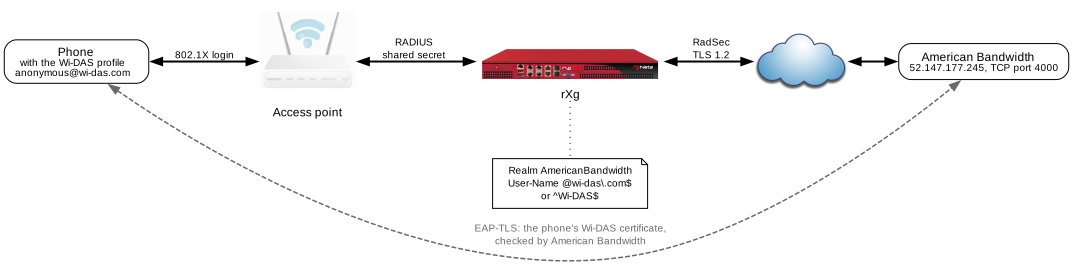
Read Passpoint first. It covers the setup every provider shares; this page covers what American Bandwidth needs.
Key points:
- Trust American Bandwidth's self-signed server certificate as a certificate authority, with the CA config template below.
- Allow TLS 1.2. American Bandwidth doesn't speak TLS 1.3.
- Give the RADIUS Proxy Server a RadSec Certificate. Without one, the rXg uses plain RADIUS.
- Match the realm on
User-Nameonly. American Bandwidth doesn't answer Accounting-On or Accounting-Off, so a realm that matches by IP address or SSID gets the server marked dead.- Restart the RADIUS server after the changes.
American Bandwidth Facts
These were observed in testing. Confirm them with American Bandwidth before relying on them.
| RadSec server | 52.147.177.245, TCP port 4000 |
| TLS | Version 1.2 only. An rXg allowing only TLS 1.3 fails with unexpected eof while reading |
| Server certificate | Self-signed, CN=ameriband.com, serial 477A9901B42B00E2423182F28DA6E1AD15A9687A, valid until 3025. The rXg must trust it as a certificate authority (CA template below) |
| Client certificate | Not requested at the RadSec layer |
| Phone login | EAP-TLS with a certificate from the Wi-DAS profile. Outer identities seen: [email protected], and from some devices Wi-DAS with no realm |
| Advertising | Roaming consortium OI 8c1f6467b4, NAI realm and domain wi-das.com. In testing, the phone matched on the domain |
| Accounting | Start, Interim-Update and Stop are answered. Accounting-On and Accounting-Off are not |
| A good login | About 11 request rounds, ending in an Access-Accept with the session keys, EAP-Success and Session-Timeout = 7200 |
rXg Setup
- Trust American Bandwidth's server certificate. Add it to Certificate Authorities, with the CA config template below or by pasting the PEM. The rXg checks a RadSec server against every CA in that list, so the CA needs no link to the realm. Without it, the handshake fails with
self-signed certificateandunknown CA. - Allow TLS 1.2. In RADIUS Server Options, set Minimum TLS Version to 1.2. A Maximum TLS Version of 1.3 is fine, and OpenRoaming needs it.
- Add a RADIUS Proxy Server (Services >> RADIUS). The realm config template below does this step and the next one together:
- Host
52.147.177.245. - RadSec(TLS) ticked, RadSec port
4000. - RadSec Certificate: any certificate with a private key. American Bandwidth doesn't ask for one, but the rXg uses RadSec only when one is set. Without it, the server is contacted over plain RADIUS. If the rXg also runs OpenRoaming, the OpenRoaming certificate is the simplest choice.
- Secret:
radsec. The form requires a secret, and RadSec always usesradsec. - Port and Accounting Port: leave the defaults. With RadSec on, only the RadSec port is used.
- Host
- Create the realm, for example
AmericanBandwidth:- RADIUS Servers: the proxy server above.
- Proxy Authentication and Proxy Accounting ticked; Create Account off.
- Attribute Patterns on
User-Nameonly:@wi-das\.com$, and^Wi-DAS$for devices whose profile sendsWi-DASas the outer identity. Anchoring the second pattern keeps it from catching other usernames. - Rank above any realm that matches the access points by IP group or policy.
- No other patterns, IP groups or policies. Above all, no
NAS-IP-Addresspattern for127.0.0.1; see Traps.
- Hotspot WLAN Profile: add an identity provider for American Bandwidth. Give it the Home Organization ID
8c1f6467b4, and a Hotspot RADIUS Realmwi-das.comwith the EAP Method EAP-TLS. Set the Operator Profile domain towi-das.com; this is the setup tested with a Wi-DAS phone. Set internet as available. - WLAN: Hotspot 2.0? ticked, with the profile above, and RADIUS Accounting on, as in Passpoint.
- Restart the RADIUS server after the certificate and realm changes (
cd /; rrapp Radiusd). The restart also clears a dead mark left by earlier failures.
Config Template: American Bandwidth's CA
Paste into a new Config Template and apply it. The CA is identified by its name, so applying the template again updates the same entry instead of adding another. Before trusting the certificate, compare its serial and fingerprint in the comments with what 52.147.177.245:4000 presents (see Checks).
---
# Trust American Bandwidth's RadSec server (52.147.177.245:4000), which presents
# this self-signed certificate. Without it the rXg aborts the TLS handshake with
# "unknown CA" and marks the server dead.
#   subject: CN=ameriband.com, O=ameriband, L=Miami, ST=FL, C=US
#   serial:  477A9901B42B00E2423182F28DA6E1AD15A9687A
#   sha256:  07:63:A0:4D:AD:22:CC:9A:31:F3:9E:01:67:9D:26:E1:57:FA:49:A4:DA:6B:2D:51:21:8F:0C:3E:6F:6A:51:43
#   expires: 5 Feb 3025
certificate_authorities:
- name: American Bandwidth RadSec (ameriband.com)
  note: Server trust for RadSec to American Bandwidth (52.147.177.245:4000).
  certificate: |
    -----BEGIN CERTIFICATE-----
    MIIDqTCCApGgAwIBAgIUR3qZAbQrAOJCMYLyjabhrRWpaHowDQYJKoZIhvcNAQEL
    BQAwVjEWMBQGA1UEAwwNYW1lcmliYW5kLmNvbTELMAkGA1UEBhMCVVMxCzAJBgNV
    BAgMAkZMMQ4wDAYDVQQHDAVNaWFtaTESMBAGA1UECgwJYW1lcmliYW5kMCAXDTI1
    MTAwNTE5NDU1NloYDzMwMjUwMjA1MTk0NTU2WjBWMRYwFAYDVQQDDA1hbWVyaWJh
    bmQuY29tMQswCQYDVQQGEwJVUzELMAkGA1UECAwCRkwxDjAMBgNVBAcMBU1pYW1p
    MRIwEAYDVQQKDAlhbWVyaWJhbmQwggEiMA0GCSqGSIb3DQEBAQUAA4IBDwAwggEK
    AoIBAQDdOeyGt/O1HY0mcGfHhSkDmJY7bXWJQYqIyn+j4q7iobTjJwoOwi02kWDj
    /mz9mv1oxo3qhGw8uJCuTu4xjJqDt2reuWch4g4sW29tofdxSWfxe/n+wYZGbghG
    ium2r6zxcF9ZHVx2bLKPvAD/dMwN/m3KhGJH+4ILBlclSzI6bLWD8A/ADqtUivZ/
    UKt/vrNK0IV5gX5BAOWq4d+lyLLghVK8YZc9CMjTaYjyDZJq4WHAlpNq+YYYEFuj
    F0NWa3XQqNlvJYAeN4c9M3sGO0skjOFa3ufX0Ys/DYaB4kZw9O6Y06sKwCF5D3o1
    +6IzRW+wvH1lZRVeukkEniCGZCx/AgMBAAGjbTBrMB0GA1UdDgQWBBR7eTQNllNL
    ldEt7kvRFJVcf6zl+jAfBgNVHSMEGDAWgBR7eTQNllNLldEt7kvRFJVcf6zl+jAP
    BgNVHRMBAf8EBTADAQH/MBgGA1UdEQQRMA+CDWFtZXJpYmFuZC5jb20wDQYJKoZI
    hvcNAQELBQADggEBAHIZZYsKZSiV/NchdJQlzNENlu0xCkwzlzbeOT7/5bpT2pdW
    QaRMRZv6tVMS5CxldGqpxs6Y0eW5+lpQJ/4e+GPK0JO0d59qi88DBoHeIO3quMLp
    hkX4JJy3D0kW+WabrxLsLryC5YAj8c3YW02CvU1Q/mY4wiYYhWAB10dleVi2WNRV
    z5uifs6oX0aXEw73dNZAD5Gsgu9mVrZPkDSHD78niNZnpoNxZO6fJheeimb8FJ1/
    vCk/sprWCO8b3KFSTW58M9yqt0ADvrYOcdNYjBMj0aBNlwwOfAAE7H2+IFQ/i0Vl
    IMLqR7QXnCR2q3/GzgIsu5WUZq7QNTDfFINh6ZA=
    -----END CERTIFICATE-----
Config Template: American Bandwidth's Realm
This template creates the realm from step 4 and, inside it, the proxy server from step 3. Before applying it, replace REPLACE WITH A CERTIFICATE NAME with the name of a certificate on the rXg that has a private key. That certificate becomes the RadSec Certificate. If no certificate has that name, the template fails and changes nothing.
Applying the template again updates the same entries. The realm is found by its name, and the proxy server by its host. The realm's attribute patterns are replaced by the two below. If your realm has another name, change name to match it, or the template adds a second realm.
The template doesn't set the Minimum TLS Version, the Hotspot WLAN Profile or the WLAN. Do steps 2, 5 and 6 by hand, then restart the RADIUS server.
---
# Fail and roll back if anything below can't be found, such as the certificate.
strict: true

RadiusServer:
- name: AmericanBandwidth
  note: Passpoint logins for American Bandwidth's Wi-DAS service.
  # Realms are checked from the highest rank down. Keep this one above
  # OpenRoaming and above any realm that matches the access points.
  rank: 2
  proxy_authentication: true
  proxy_accounting: true
  create_account: false
  # Required, but unused without VLANs.
  vlan_sharing: device
  # Match on User-Name only. A pattern on NAS-IP-Address or Called-Station-Id
  # can also catch Accounting-On/Off or the health check.
  radius_attribute_patterns:
  - pattern: '@wi-das\.com$'
    radius_attribute: User-Name
    logic: OR
    priority: 0
  - pattern: '^Wi-DAS$'
    radius_attribute: User-Name
    logic: OR
    priority: 0
  radius_realm_servers:
  - host: 52.147.177.245
    name: American Bandwidth RadSec
    radsec_enabled: true
    radsec_port: 4000
    # RadSec always uses the secret "radsec".
    secret: radsec
    # The rXg uses RadSec only when a certificate is set. American Bandwidth
    # doesn't check it, so any certificate with a private key works.
    ssl_key_chain:
      name: REPLACE WITH A CERTIFICATE NAME
      _update: true
A Login That Reaches American Bandwidth
These lines appear in /var/log/radius/radius.log, in order:
find_match_attributes AVP User-Name => [email protected] matches RadiusAttributePattern /@wi-das\.com$/
realm_matches_request request matches pattern set in RadiusServer "AmericanBandwidth" rank(N)
find_radius_server found configured RadiusServer "AmericanBandwidth" for the request
check_proxy_to_realm proxying request to realm "AmericanBandwidth"
radiusd: ... adding new socket proxy (<rXg>, <port>) -> home_server (52.147.177.245, 4000)
About 11 rounds follow with no TLS errors, ending in an Access-Accept.
Failure Signatures
The common ones are in Troubleshooting. These are specific to American Bandwidth:
| What the logs show | Cause | Fix |
|---|---|---|
error 18 : self-signed certificate, Alert write:fatal:unknown CA, certificate verify failed |
American Bandwidth's certificate isn't in Certificate Authorities | Apply the template, then restart the RADIUS server |
unexpected eof while reading on the TLS connection |
The rXg allows only TLS 1.3 | Set Minimum TLS Version to 1.2 |
Failed to find live home server, Marking home server 52.147.177.245 port 4000 as dead; logins rejected under the realm with Failed to find live home server for realm americanbandwidth: Cancelling proxy |
An earlier failure, such as a TLS error or unanswered Accounting-On/Off, marked the server dead. It is tried again after the proxy server's Revive interval (120 seconds by default) | Fix the earlier failure, then restart the RADIUS server to clear the mark at once |
| All the rounds complete, then an Access-Reject with no reason | American Bandwidth rejected the phone's certificate, for example one not issued through Wi-DAS | Use a phone with a current Wi-DAS profile |
One SSID or Several
The tested setup gives American Bandwidth its own SSID and Hotspot WLAN Profile.
On the rXg side, one SSID could serve American Bandwidth and OpenRoaming together. The American Bandwidth realm matches on the login's domain at the higher rank, and the OpenRoaming realm finds its providers through DNS. But a profile names only one operator domain. On a shared profile, Wi-DAS phones would have to choose the network by the RCOI or NAI realm instead. That has not been tested.
Checks
These are read-only and work in the rXg's shell.
Which certificate American Bandwidth presents; compare it with the template:
openssl s_client -connect 52.147.177.245:4000 -tls1_2 -showcerts < /dev/null | openssl x509 -noout -subject -serial -enddate
Whether the RADIUS server currently counts American Bandwidth as alive, zombie or dead:
radmin -f /var/run/radiusd/freeradius.control.sock -e "show home_server list" | grep 52.147.177.245


