Passpoint
Passpoint lets a phone join Wi-Fi on its own, securely, with no captive portal and no shared password. The phone uses a profile from its identity provider: the carrier, company or school that holds the user's login. Passpoint is a Wi-Fi Alliance program, first called Hotspot 2.0.
On an rXg network, the access points advertise the network, and the rXg forwards each login to the right identity provider.
This article explains how a Passpoint login travels through the rXg, and the setup that every identity provider needs. Each provider then has its own page:
- Static providers: a provider with a fixed RadSec server. American Bandwidth (Wi-DAS) is the example.
- Dynamic providers: a federation whose providers the rXg finds through DNS. OpenRoaming is the example, and eduroam works the same way.
Passpoint Reports covers what the venue owes each provider afterwards: reports of its subscribers' usage, sent on a schedule.
The article is written for OpenWiFi access points managed by the rXg. On a RUCKUS SmartZone controller, the rXg syncs Hotspot 2.0 WLANs and profiles only when the WLAN Controller's Configure hotspot wlan option is on. On RUCKUS One, Hotspot 2.0? has no effect.
Key points:
- On the WLAN, tick Hotspot 2.0? and pick a Hotspot WLAN Profile. Without both, the access points advertise nothing.
- Make the SSID an rXg WLAN, so the access points use the rXg's RADIUS secret.
- Match a static provider's realm on
User-Nameonly. Never match on the SSID,NAS-IP-Address, IP groups or policies.- Give a dynamic provider's realm, for OpenRoaming or eduroam, a rank that no other realm uses.
- Leave Create Account off on Passpoint realms.
- Restart the RADIUS server after changing certificates.
- Judge a login by the RADIUS Server Logs, not by the phone saying "Connected".
- Send each identity provider its usage with a scheduled Passpoint Identity Provider report; see Passpoint Reports.
Terms
| Term | Meaning |
|---|---|
| Identity provider | The organization that holds a user's credentials and decides whether the user may log in, such as a mobile carrier, a company or a school |
| RADIUS | The protocol access points use to ask a server whether a device may join, and to report how the device used the network. See RFC 2865, and RFC 2866 for accounting |
| RadSec | RADIUS carried inside TLS, so it can cross the internet safely. See RFC 6614 |
| EAP | The login conversation between the phone and its identity provider. EAP-TLS uses a certificate on the phone, and EAP-TTLS a password inside TLS. See RFC 3748 and RFC 5216 |
| Outer identity | The public username a phone sends first, such as [email protected]. The part after the @ names the provider. The real identity stays hidden inside EAP. See RFC 7542 |
| NAI realm | The domain part of a username, such as provider.example. Access points advertise NAI realms so phones know which providers the network accepts |
| RADIUS Server Realm | An rXg record that decides which logins go to which provider. It is not the same thing as an NAI realm |
| RCOI | Roaming consortium organization identifier: a short hexadecimal code for a group of providers, such as 5a03ba0000 for OpenRoaming |
| ANQP | Access Network Query Protocol: the questions a phone asks an access point before it joins |
| Accounting | RADIUS messages that report when a session starts, how much data it uses, and when it ends |
| Home server | The RADIUS server's name for a server it forwards logins to. It appears in the logs, for example in Failed to find live home server |
How a Passpoint Login Works

- Advertise. The access point's beacons say that the network supports Passpoint. They carry up to three RCOIs.
- Ask. Before joining, the phone asks the access point for details over ANQP. The answers list the operator's domain, the NAI realms with their EAP methods, the full RCOI list, and venue information.
- Match. The phone compares the answers with its installed Passpoint profiles. If one matches, the phone joins by itself. The user does not pick the SSID.
- Log in. The phone starts an 802.1X EAP login with its outer identity, such as
[email protected]. The access point sends the login to the rXg's RADIUS server. It signs each request with the shared secret from RADIUS Server Options. - Choose a realm. The rXg picks a RADIUS Server Realm for the login, by rank and attribute patterns. A Passpoint realm forwards (proxies) the login instead of answering it.
- Forward. The rXg sends the login to the identity provider's server over RadSec. EAP runs between the phone and the provider. The rXg and the access point only carry it, and never see the user's credential.
- Accept. The provider answers with an Access-Accept that holds the session keys. The access point finishes the WPA handshake, and the phone is online.
- Account. The access point sends accounting messages (Start, Interim-Update and Stop) to the rXg. The rXg records them in the RADIUS Server Logs, and either forwards them to the provider or answers them itself. See Accounting.
Each hop is trusted separately. A login fails if any one hop fails, so check the hops one at a time:
| Hop | How each side trusts the other |
|---|---|
| Access point and rXg | The RADIUS shared secret from RADIUS Server Options. The rXg pushes it to its OpenWiFi access points |
| rXg and identity provider | TLS (RadSec). The rXg checks the provider's server certificate against Certificate Authorities. It presents its own certificate if the provider asks for one |
| Phone and identity provider | EAP, usually EAP-TLS or EAP-TTLS, carried through both hops. The rXg's own EAP certificate plays no part |
Two Kinds of Identity Provider
For each login, the rXg decides where to send it. Either a static provider's realm takes the login, or the login's domain leads through DNS to a dynamic provider, such as an OpenRoaming one:
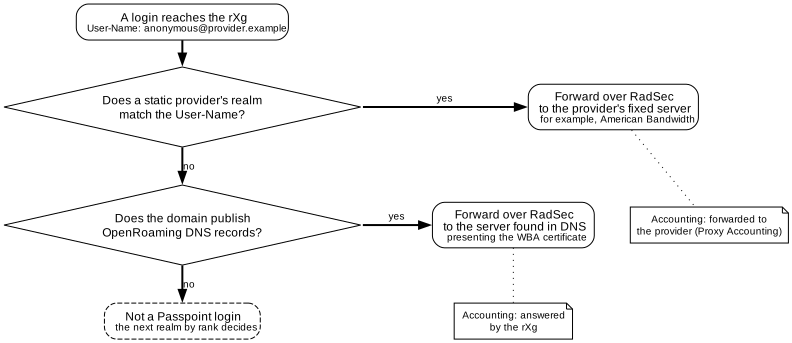
| Static provider | Dynamic provider | |
|---|---|---|
| Examples | American Bandwidth (Wi-DAS) | OpenRoaming, eduroam |
| How the rXg finds the server | A fixed address, entered as a RADIUS Proxy Server | A DNS lookup on the realm part of each login's outer identity |
| rXg setting | The realm's RADIUS Servers | The realm's Enable OpenRoaming or Enable eduroam, with a Dynamic RadSec Client Cert |
| Client certificate | Only if the provider asks for one | Always. The federation's PKI issues it |
| Accounting | Forwarded to the provider when Proxy Accounting is on | Answered by the rXg; not forwarded |
One dynamic realm reaches every identity provider in its federation. A static realm reaches one provider.
The Building Blocks
| Item | Where | What it does for Passpoint |
|---|---|---|
| Certificate Authorities | System >> Certificates | Trusts the providers' RadSec server certificates. For RadSec, the rXg trusts every CA in this list, so a CA needs no link to a realm |
| Certificates | System >> Certificates | The rXg's own RadSec certificate. A RADIUS Proxy Server uses RadSec only when it has a RadSec Certificate, even if the provider never asks for one |
| RADIUS Server Options | Services >> RADIUS | The shared secret the access points use, and the Minimum TLS Version and Maximum TLS Version for every RadSec connection |
| RADIUS Proxy Servers | Services >> RADIUS | The RadSec servers of static providers |
| RADIUS Server Realms | Services >> RADIUS | Which logins go to which provider, and how |
| Hotspot WLAN Profiles | Network >> Wireless | What the access points advertise |
| WLANs | Network >> Wireless | The SSID that carries Passpoint |
The field-by-field reference for each is in Certificates, RADIUS and Wireless. The rest of this article covers how they fit together for Passpoint.
Setup Common to Every Provider
TLS Versions
In RADIUS Server Options, set Minimum TLS Version to 1.2 and Maximum TLS Version to 1.3. Both default to 1.2. American Bandwidth only speaks TLS 1.2. Some OpenRoaming identity providers fail when the rXg is limited to TLS 1.2; see OpenRoaming. The setting applies to every RadSec connection. There is no per-server override.
Certificates
Add each provider's server certificate authority (CA) to Certificate Authorities. Paste the PEM, or apply a config template. The provider pages give the details.
All RadSec connections check providers' servers against one shared CA file. Each connection sends the certificate chain from its own Certificate. Even so, one Certificate for all of the rXg's RadSec connections is simplest. If the rXg runs OpenRoaming, use the OpenRoaming certificate everywhere.
Hotspot WLAN Profile
A Hotspot WLAN Profile decides what the access points advertise. Its parts, as the phone sees them:
- Operator Profile: the domain name and friendly name. A phone whose profile names this domain treats the network as its home network. A profile has one operator, so it can name only one domain.
- Identity Providers: one entry per provider. Each one holds:
- Home Organization IDs: the RCOIs to advertise, as 6 or 10 hexadecimal characters (for example,
5a03ba0000for OpenRoaming). - Public Land Mobile Networks: mobile network codes, for logins with a SIM card.
- Hotspot RADIUS Realms: NAI realms such as
provider.example, each with its EAP Methods. A realm with no EAP method is left out of the advertisement.
- Home Organization IDs: the RCOIs to advertise, as 6 or 10 hexadecimal characters (for example,
The venue name and URL come from the rXg's FQDN in Device Options.
A phone can match on an RCOI, an NAI realm or the domain. The provider's profile decides which, so advertise everything the provider gives you. Phones tend to check RCOIs first, so list the most used ones first. One profile can list several providers.
WLAN
On the WLAN:
- Tick Hotspot 2.0? and pick the Hotspot WLAN Profile. Hotspot 2.0? also sets authentication to IEEE Std 802.1X EAP and encryption to WPA2.
- MFP (802.11w): leave it blank or set it to Capable. The access points then offer management frame protection, and phones that support it use it. Passpoint release 2 phones negotiate it, and the lab phones' requests showed it in use (
WLAN-Group-Mgmt-Cipher). Required turns away devices without it, and Passpoint logins don't need it. - Tick RADIUS Accounting, so the access points send accounting. See Accounting.
- Add the WLAN to the AP Profiles of the access points that should carry it.
Important: Hotspot 2.0? and the Hotspot WLAN Profile must both be set. With only one of them, the access points advertise nothing, and the rXg gives no warning.
Make the SSID an rXg WLAN instead of setting it up on the access point by hand. The rXg then pushes its own RADIUS secret to the access points. If an access point signs requests with a different secret, the RADIUS server drops them without logging anything.
RADIUS Server Realms
Create one RADIUS Server Realm for each static provider, and one for each dynamic provider's federation (OpenRoaming or eduroam). Then follow these rules:
- Match a static provider's realm on the login's username only. Add an attribute pattern on
User-Namefor the realm part of the outer identity, such as@provider\.example$. Some profiles send an outer identity without a realm. Match those with an anchored pattern, such as^Provider$. - Don't match on anything else. Leave out SSID (
Called-Station-Id) patterns,NAS-IP-Addresspatterns, IP groups and policies. Each of them can catch traffic that must not reach the provider. - Rank the realm above any realm that matches the access points by IP group or policy. When realms share a rank, the priority of what matched decides between them, and an IP group can win.
- Give a dynamic provider's realm a rank no other realm uses. When such a realm shares its rank, a login it matches can still end up with a lower-ranked realm, or with no realm at all. The login still reaches the identity provider, but the rXg applies and logs the wrong realm.
Important: The first two rules prevent the worst failures in this guide, described in Traps. A realm that matches by IP address or SSID can catch the rXg's own health check, or the access points' Accounting-On and Accounting-Off messages, and send them to the provider.
Once a dynamic provider's realm exists, some logins skip the realm ranks. A login whose domain already has a discovered server goes straight to that server. A discovered server exists only after the dynamic realm has handled a login for that domain. It is loaded again whenever the RADIUS server restarts. A static provider's realm is affected only if its domain also publishes OpenRoaming DNS records. American Bandwidth's domains publish none.
Proxy Options
The Proxy Options on a realm behave differently for static and dynamic realms:
| Setting | Static realm (RADIUS Servers) | Dynamic realm (OpenRoaming, eduroam) |
|---|---|---|
| Proxy Authentication | Forwards logins. On by default | No effect: logins are always forwarded once a server is found |
| Proxy Accounting | Forwards accounting. On by default | No effect: the rXg answers accounting |
| Proxy MAC auth | Forwards MAC authentication requests | No effect |
| Replace username | Replaces the User-Name with the account's login before forwarding | No effect |
| Create Account | Creates an account for each new forwarded login | Same as static |
| Usage Plans | The plan and group given to created accounts | Same as static |
Inserted Attributes whose modification type includes requests are added to forwarded requests on both kinds of realm.
Leave Create Account off for Passpoint realms. The account's login comes from the outer identity without its realm. So every phone that sends [email protected] shares one account, named anonymous. If that account's plan sets no time or data, the rXg adds zero limits to the Access-Accept, such as a Session-Timeout of 0. The access point then disconnects the phone right after it joins. Providers that send their own Session-Timeout, such as American Bandwidth (7200 seconds), are not affected.
If the realm ever had Create Account on, delete the accounts it made from shared identities. An account with active sessions may refuse to delete ("can't be destroyed"). Delete its sessions first.
Accounting
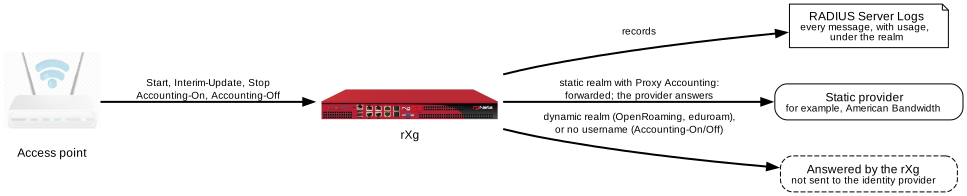
Who answers accounting:
- For a static realm with Proxy Accounting on, the rXg forwards accounting to the provider, and the provider answers.
- For a dynamic realm, the rXg answers. Discovered servers only take logins, so accounting is not forwarded to OpenRoaming or eduroam identity providers.
- Either way, the rXg records every accounting message, with usage, in the RADIUS Server Logs under the realm.
Those logs feed the Passpoint reports. A provider whose accounting the rXg answers gets its usage from a scheduled Passpoint Identity Provider report instead; see Passpoint Reports.
How often OpenWiFi access points send Interim-Updates depends on their firmware:
- 4.2.4: every 60 seconds. An
Acct-Interim-Intervalin the identity provider's Access-Accept is ignored. - 5.1: at the
Acct-Interim-Intervalin the Access-Accept, if it is 60 seconds or more. If the provider sends none, the access point sends only Start and Stop. Most providers tested sent none.
Acct-Interim-Interval is defined in RFC 2869. WBA guidance is to take the interval from the identity provider, as 5.1 does.
The rXg can also end a RADIUS login session that has gone quiet. It does so when no accounting has arrived for twice the Acct-Interim-Interval in the realm's Inserted Attributes. Two limits apply:
- The realm must have that attribute. Without it, the rXg never ends a session this way.
- It applies only to clients the rXg can't see in its own ARP table or DHCP leases. Where the rXg routes the clients' traffic, it never applies.
Where the rXg doesn't route the clients' traffic and the access points run 5.1, leave the attribute out. Otherwise a provider that sends a longer interval, or none, has its clients logged out early.
Access points also send Accounting-On and Accounting-Off whenever they restart or their WLANs change. These carry no username. So a realm that matches only on User-Name never sees them, and the rXg answers them itself. A realm that matches on anything else can catch them; see Traps.
Phones
- Install the provider's Passpoint profile, from the provider's app, website, carrier or device management. Then let the phone join on its own. Settings may show the provider's name instead of the SSID.
- Don't tap the SSID by hand. That starts an ordinary enterprise login with whatever is typed, not Passpoint.
- A phone that rejoins with keys cached from an earlier login never reaches the RADIUS server. The logs then show an accounting Start with no Access-Request before it. "Connected" alone proves nothing: look for a new Access-Accept in the logs. Turning Wi-Fi off and on doesn't always force a full login.
- If a phone stops recognizing the network, reinstall or regenerate its profile first.
Checking a Login
The RADIUS Server Logs (Archives >> RADIUS Server Logs) show one row per login result and one per accounting message, with the Realm, User-Name and Response. A forwarded login that is rejected is logged too. The reason is in the Request attributes, as Module-Failure-Message, for example Failed to find live home server for realm provider: Cancelling proxy.
The RADIUS server's own log, /var/log/radius/radius.log, shows each step. A login that reaches a provider shows lines like these, in order:
find_match_attributes AVP User-Name => [email protected] matches RadiusAttributePattern /@provider\.example$/
find_radius_server found configured RadiusServer "Provider" for the request
check_proxy_to_realm proxying request to realm "Provider"
After changing certificates or certificate authorities, restart the RADIUS server from the rXg shell. Start from /. If you start from a directory that the RADIUS user can't read, the restart fails with a permission error:
cd /; rrapp Radiusd
A restart also clears a server that earlier failures marked dead. Without a restart, the RADIUS server marks a dead server alive again after the proxy server's Revive interval (120 seconds by default). It then tries the server with the next login.
To see the state of each server the RADIUS server forwards to, run this read-only command. Each server shows as alive, zombie (not answering lately) or dead:
radmin -f /var/run/radiusd/freeradius.control.sock -e "show home_server list"
Troubleshooting
Provider-specific messages are on each provider's page.
| What the logs show | Cause | Fix |
|---|---|---|
| Nothing for the phone; the access point retries every few seconds | The access point signs requests with the wrong RADIUS secret. The RADIUS server drops them (invalid Message-Authenticator) before logging a user or MAC |
Make the SSID an rXg WLAN, so the rXg pushes its secret |
failed to find a configured RadiusServer for the request, then Alert read:fatal:certificate unknown |
No realm matched the login. The rXg ran EAP itself, and the phone refused the rXg's certificate | Compare the User-Name in the log with the realm's patterns |
Called-Station-Id => ... does not match |
The realm relies on an SSID pattern, and the access point formats that field differently | Match on User-Name instead |
Failed to find live home server, Marking home server ... as dead; rejects logged with Cancelling proxy |
An earlier failure, such as a TLS error or an unanswered message, marked the server dead. Logins then fail at once without being sent, until the proxy server's Revive interval (120 seconds by default) has passed | Fix the earlier failure. Then restart the RADIUS server to clear the mark at once |
| The RADIUS server restarts every few minutes, with health notices | A realm matches the rXg's own health check (see Traps) | Remove the realm's 127.0.0.1 or IP-group match |
| All the EAP rounds complete, then an Access-Reject | The provider rejected the phone's credential | Check the phone's profile with the provider |
perl: Failed to create pair - Invalid vendor name in attribute name "attribute_matches" |
A known, harmless message | None. Look for the real error next to it |
Traps
Both traps start with a realm that matches on something other than User-Name.
The Health Check

About every 11 seconds, the rXg sends itself a test login (rg_rad_check) from 127.0.0.1. If the answer is anything but an Access-Accept, the rXg raises a health notice and restarts the RADIUS server.
Now suppose a provider's realm matches that test login, through a NAS-IP-Address pattern for 127.0.0.1 or an IP group that contains it. The test login goes to the provider, which rejects it. The RADIUS server then restarts again and again, and logins in progress die with each restart. A User-Name pattern on the realm part never matches the test login.
Accounting-On and Accounting-Off
Every access point restart, configuration push or WLAN change makes the access point send Accounting-On or Accounting-Off for each SSID with accounting. These messages carry the access point's address and the SSID, but no username. If a provider's realm matches on the SSID or the access point's address, they go to the provider. A provider that never answers them is marked zombie after about 20 seconds, then dead. Real logins are then rejected until it recovers.
An SSID pattern can look harmless while an access point sends a malformed SSID field. Fixing the access point later springs the trap. Remove SSID and IP-group matches from the realm before, or together with, any access point fix.
Checklist
Before testing with a phone, check each item. They repeat the key points of this article.
- RADIUS Server Options: Minimum TLS Version 1.2, Maximum TLS Version 1.3.
- Each provider's CA is in Certificate Authorities, and the RADIUS server was restarted afterwards.
- The Hotspot WLAN Profile advertises the provider's RCOIs, NAI realms (each with an EAP method) and domain.
- The WLAN is an rXg WLAN, with Hotspot 2.0? ticked, the profile picked, RADIUS Accounting on, and the right AP Profiles.
- Each static provider's realm matches on
User-Nameonly, and ranks above realms that match by IP group or policy. - Each dynamic provider's realm, for OpenRoaming or eduroam, has a rank of its own.
- Create Account is off on every Passpoint realm.
- A phone with the provider's profile joins on its own, and a new Access-Accept appears in the RADIUS Server Logs.
Further Reading
- Passpoint Reports: sending each identity provider its usage, and the operator portal's Passpoint page.
- Passpoint, from the Wi-Fi Alliance: what Passpoint is and which devices support it.
- OpenRoaming, from the Wireless Broadband Alliance, and its specification draft at the IETF.
- RFC 2865: RADIUS. RFC 2866: RADIUS accounting. RFC 2869: RADIUS extensions, including
Acct-Interim-Interval. - RFC 6614: RadSec, RADIUS over TLS.
- RFC 7585: finding RADIUS servers through DNS, as OpenRoaming and eduroam do.
- RFC 3748: EAP. RFC 5216: EAP-TLS.
- RFC 7542: usernames with realms (the Network Access Identifier).
- FreeRADIUS documentation: the RADIUS server the rXg runs.


